+22.0%
Stock XIRR

A guy obsessed with learning new tech and building things that actually work. I can vibecode a full-stack application from scratch. I manage a personal stock portfolio at 22%+ XIRR, run Google Ads campaigns for high ROI, and live inside Excel.
I also love studying how companies navigate crisis, figuring out where things broke and why. Equal parts creative and analytical, raised in Bengaluru, which means survival requires fluency in at least four languages :)
Bull & Bear Chronicles
I don't just read their financial reports — I scrape X and Reddit and try to understand the emotion and narrative around that company and sector more than any financial report.
// Speculative internet exuberance collided with accelerating cash burn, wiping 78% off the NASDAQ over 2.5 years.
Featured Projects
// building the resume arc
JavaScript / Manifest V3 / Python
Hit your limit on Claude, ChatGPT or Gemini? Download the whole chat as clean Markdown and paste it into another model. Full context, one click.
Python / Next.js / Tailwind CSS
Type a name and see it spelled with real NASA satellite photos of places on Earth that naturally look like letters.
Rust / Tauri / whisper.cpp / React
Turn your voice into words in any app you're using, completely free and local (on device). Think Whisper Flow, but free. All under 3 seconds.

JavaScript / face-api.js / Chrome MV3
A Chrome extension that scrolls YouTube Shorts when you open your mouth. Eyebrows go back. Built because reaching for the trackpad took too much effort.
Certifications & Awards
// ECAs Maxxxingg
ISSUED BY DMS IIT DELHI · MARCH 2026
2nd Runners Up at IIT Delhi's Excelerate '26 out of ~1,320 teams. National Level Excel data analytics competition testing speed, accuracy, and formula-based problem solving under pressure.
ISSUED BY IIM INDORE · JAN 2026
National Finalist, B2C (Marketing Case Competition) Iris'26 — IIM Indore · Top 30 out of 1,654 teams · Invited to final offline round at IIM Indore campus · Competed as first-year undergraduates against MBA-level candidates
Blog & Analysis
// eco, fin, and business
Code Activity
// mostly just building things
// things i ended up learning along the way
Experience
Member · Tech & Innovation Club
Social Internship
Interned with Rotary International’s Bengaluru office at Manyata Tech Park, working to bridge the employability gap for autistic adults in India.
Built a Naukri-style employment database for autistic adults, along with a marketplace where participating schools can list merchandise for companies to purchase.
Education
Bachelor of Business Administration (BBA)
Portfolio Dashboard
Equities
Blinkit was growing faster than food delivery ever did. The market priced a food app. I bought a quick commerce company hiding inside one.
Gold appreciation was the thesis. The 2.5% annual interest was just free money on top. Better than physical gold in every measurable way.
Best SUVs in the segment, strong fundamentals, and an EV lineup that actually shipped. Most auto companies promise an EV future. M&M delivered one.
India is massively underpenetrated on air travel. IndiGo has 60%+ market share and no serious domestic competitor left standing. A market structure bet more than a company bet.
Every retail investor who opens a Zerodha or Groww account eventually touches BSE infrastructure. Bet that the retail explosion was structural, not a pandemic fluke. And it wasn't.
Every vehicle on Indian roads needs new tyres every few years regardless of the economy. The replacement market is massive, recurring, and largely ignored. CEAT has been quietly taking share.
Real estate arm sitting on prime land parcels across Mumbai with strong execution on residential launches. Apparel funds operations while realty does the heavy lifting on value creation.
Two businesses that would each be Nifty 50 companies on their own. Jio owns India's digital infrastructure. The refinery is one of the largest in the world. The stock underperformed but the businesses didn't.
The incubator for everything Adani touches next. Airports, green hydrogen, data centres, roads — all pass through here before becoming standalone listed companies. Buying early access to India's infrastructure pipeline.
India is quietly becoming the diabetes and obesity capital of the world. Sun Pharma's GL0034 (Utreglutide) is a homegrown long-acting GLP-1 agonist sitting on a market that hasn't even formed yet. Holding through the red.
They make good cars. Thesis didn't work out.
Mutual Funds
Writing
Insights on economics and finance.
07 OCT 2025 — RESEARCH
A data-driven deep dive into India's Global Capability Centre landscape — growth, talent, real estate, and city comparisons.
FEB 2026 — ANALYSIS
A data-driven deep dive into OpenAI and Anthropic's finances — revenue, burn rates, and the path to profitability.
COMING SOON
COMING SOON
Research Report · 07 Oct 2025
A Global Capability Centre (GCC) is an office set up by a multinational company in India to handle their internal work like tech, finance, and analytics. Unlike outsourcing, the parent company fully owns it.
Examples: JPMorgan's tech hub in Mumbai, Goldman Sachs in Bengaluru, Microsoft's R&D centre in Hyderabad, Boeing's engineering centre in Bengaluru.
National Market Overview
India's GCC sector is transitioning from a cost-centric hub to a strategic global innovation centre.
City Deep Dive
Analysis · Feb 2026
OpenAI and Anthropic are the two most valuable AI startups on Earth. Together they've raised over $60 billion. Neither has turned a profit. Here's why that's about to change.
The Billion-Dollar Bonfire
In the first half of 2025 alone, OpenAI posted a $13.5 billion net loss — burning roughly $575,000 every hour. Anthropic, while more restrained, still burned through $3 billion in 2025. The AI industry's two flagship companies are haemorrhaging cash at a pace that makes the dot-com era look frugal. But unlike Pets.com, these companies have revenue — and it's growing at an unprecedented clip.
OpenAI tripled revenue from $3.7B (2024) to $13.1B (2025), driven by ChatGPT's 900 million weekly users and aggressive enterprise expansion. Anthropic's trajectory is even steeper — from $1B to $9B in the same period, a 9x leap fuelled almost entirely by enterprise API adoption. By February 2026, Anthropic's annualized run-rate hit $14B, with Claude Code alone generating $2.5B — more than most public SaaS companies earn in total.
Where the Money Comes From
The two companies pursue fundamentally different revenue strategies. OpenAI is consumer-first — ChatGPT subscriptions drive the bulk of revenue, supplemented by API sales and a growing enterprise segment. Anthropic is enterprise-first — 80% of its revenue comes from business customers, with over 300,000 companies using Claude and 500+ spending more than $1M annually.
This distinction matters enormously. Enterprise contracts are stickier, more predictable, and higher-margin than consumer subscriptions. Anthropic generates $2.10 per compute dollar versus OpenAI's $1.60, according to Fortune. OpenAI's diversification into video generation (Sora), web browsing (Atlas), hardware (with Jony Ive), and even robotics demands huge capital. Anthropic has deliberately avoided these expensive adjacencies, focusing compute on its core Claude models.
Where the Money Goes
AI doesn't run on hope. It runs on GPUs — thousands, then millions of them — packed into data centres consuming as much electricity as mid-sized cities. Training a frontier model costs north of $100M. Inference costs scale with every query. And talent? Senior AI researchers command equity packages worth millions.
In H1 2025, OpenAI spent $6.7B on R&D, $2B on sales & marketing (nearly double the entire 2024 budget), and $2.5B on stock compensation. The compute margin — revenue after model-running costs — improved from 52% (Oct 2024) to 70% (Oct 2025), a strong signal that unit economics are heading in the right direction. But with OpenAI committing to ~$600B in total compute spend by 2030, the upfront infrastructure bet is enormous.
The Great Divergence
Here's where it gets interesting. Both companies burn cash today, but their paths to profitability are dramatically different.
Burn rate drops to ~33% in 2026, ~9% by 2027. Positive cash flow expected by 2027–2028. Projected $17B cash flow by 2028.
Burn stays at ~57% through 2027. $74B operating loss projected for 2028. Cash flow positive targeted for 2029–2030. Needs ~$207B more in capital.
OpenAI will burn through roughly 14x as much cash as Anthropic before turning a profit. That's the cost of building a consumer empire spanning chatbots, video, browsers, hardware, and robotics. Anthropic's laser focus on enterprise AI keeps costs tightly coupled to revenue growth.
When Do They Make Money?
The Bigger Picture
The global AI market crossed $390B in 2025 and is projected to exceed $3.4 trillion by 2033, growing at 30%+ CAGR. Enterprise AI adoption alone hit $115B in 2026. This isn't a niche — it's becoming the infrastructure layer for the entire global economy. The question isn't whether AI as an industry will be profitable. It's whether the current frontrunners will capture enough of that value to justify the investment.
The Wild Card: DeepSeek
In January 2025, Chinese lab DeepSeek released a model competitive with OpenAI's best — trained for just $5.9 million versus OpenAI's $100M+. Nvidia lost $600B in market cap in a single day. DeepSeek's models are now priced at 1/4th to 1/6th of comparable US systems. If training costs continue to plummet, the "you must spend tens of billions to compete" thesis collapses — and that's good news for profitability. Cheaper models = higher margins for everyone.
Conclusion: Yes, AI Will Be Profitable
The losses are real, but so is the trajectory. Here's why profitability is a question of when, not if:
OpenAI's compute margin went from 52% to 70% in one year. Better hardware (next-gen chips), better algorithms (distillation, quantisation), and competition from DeepSeek are all driving inference costs down. This is the single biggest lever for profitability.
78% of companies now use AI in at least one business function. 8 of the Fortune 10 use Claude. This isn't hype-driven trial usage — it's operational integration. Enterprise contracts are sticky and high-margin.
Anthropic grew revenue 9x in 2025 while reducing cash burn from $5.6B to $3B. OpenAI tripled revenue while burn grew less than 2x. The crossover point is mathematically inevitable at these growth rates.
The AI market is projected to hit $3.4 trillion by 2033. Even capturing 5–10% of that gives these companies revenue in the hundreds of billions — more than enough to cover infrastructure costs at scale.
Amazon lost money for 9 years. AWS alone now generates $100B+ annually. Netflix burned billions on content before becoming consistently profitable. The pattern of heavy upfront infrastructure investment followed by margin expansion is the defining playbook of transformative tech companies.
AI will be profitable. Anthropic will likely get there first (2027–28).
OpenAI's path is longer and riskier, but the scale of the payoff — $280B revenue by 2030 — justifies the bet.
The companies burning cash today are building the infrastructure layer of the next economy.
Sources
Coming Soon
This post is being written. Check back soon.
Coming Soon
This post is being written. Check back soon.
A browser extension that saves any Claude, ChatGPT or Gemini conversation as a clean .md file. One button, next to the chat title. Headings, lists, code blocks and tables all survive.
Works On
Why Markdown
A chat you want to keep is usually a chat you want to use again — paste back into another model, drop into notes, hand to someone else. Copy-paste destroys the structure. Screenshots destroy the text. PDF exports bloat it.
Markdown keeps the structure and is the cheapest format in tokens, so it's the clearest thing to paste back into an AI tool. It's also plain text, so it opens anywhere: Notes, Word, Obsidian, Notion, VS Code.
What Happens When You Click
The scrolling isn't for show. These sites virtualise the message list — older messages genuinely don't exist in the DOM until you scroll near them. So the extension walks the whole conversation, collecting as it renders, and puts your scroll position back where it found it.
The Tech
One adapter per site
Claude, ChatGPT and Gemini each get an adapter covering four things: where the button goes, which element actually scrolls, how to find a message, and how to read the chat title. When one of them redesigns — and they do, constantly — the fix is a couple of selectors in one object, not a rewrite.
The button that refuses to fall off
Anchors are ranked best-first, starting from the real chat-title element. If the page mounts a better anchor later — which happens constantly on apps that swap their header after load — the injector upgrades to it. That's what keeps "Export MD" sitting next to the chat name instead of drifting somewhere random.
Deduplication by content hash
Overlapping scroll steps mean the same message gets seen several times. Each one is keyed by author plus a slice of its content, so a long chat exports once — in document order — instead of three times in a shuffled one.
A hand-written DOM → Markdown converter
No Turndown, no dependencies. It walks the node tree itself and handles headings, bold, italics, strikethrough, links, nested lists, blockquotes, tables, images, inline code, fenced code with language detection, and MathML. Buttons, toolbars and screen-reader-only nodes get stripped before conversion, so the file has no UI junk in it.
Where Your Chat Goes
Nowhere. There's no server and no account. It reads the page you're already looking at and saves a file to your computer. The extension asks for no permissions beyond running on those three sites — check manifest.json; there's no permissions block at all.


Press a key. Speak. Your words get typed into whatever app you're in — in under two seconds, entirely on your own machine. No cloud, no account, no subscription. Currently under development.

The Story
I was vibe coding constantly. And the thing nobody warns you about vibe coding is that the bottleneck stops being the code and becomes your hands. Every feature needs a paragraph of context. Every bug needs the whole story. I was typing essays into a chat box for hours a day, and my hands genuinely started hurting.
So I installed Wispr Flow, and honestly — it was brilliant. The accuracy at that time was better than anything I'd used. I stopped typing prompts and started talking them. Then I hit the weekly word limit. In about two days. Paid attention the next week, hit it again in three.
So I asked Claude the obvious question: can I just build this locally, for free? And Claude, with its famously calibrated sense of difficulty, said "yeah, that's very easy" and handed me a mega-prompt. I pasted the mega-prompt into my coding agent and sat back to watch a voice-to-text app appear.
It was not very easy. The mega-prompt got me a window and an error. What it did not mention: that capturing audio, running Whisper locally, and typing into another application are three separate hard problems, each with their own operating-system permission wall. macOS won't let you type into other apps without Accessibility access. Windows needs an entirely different keyboard hook. Whisper needs the right build flags to touch the GPU at all. Every one of those was a day I did not plan for.
Then it worked. And that's when the actual work started — because a thing that works is not a product. I rebuilt the UI until it was clean, added the animations, designed the floating mic bubble, drew the logo, picked the palette, wrote the landing page, made the onboarding wizard hold your hand through the permission prompts. Fixed the parts that were technically correct and practically annoying.
This project taught me how to actually make a tech product — not a script that runs, a thing a stranger can install. Somewhere in the middle of it I stopped reading my own software as a developer and started seeing it the way a user does: what happens on first launch, what happens when a permission is denied, what happens when the model isn't downloaded yet, what happens when someone just wants to talk and doesn't care what a hotkey is.
The Point
The goal was to destroy the moat.
Wispr Flow's product is genuinely good. But its moat isn't the model — Whisper is open source and runs on the laptop you already own. The moat is the packaging: the hotkey, the polish, the cleanup layer, the fact that it just works. Everything you're actually paying a subscription for is engineering effort, not a secret.
So LocalFlow does the same job with the same model, on-device, and gives it away. If the moat is effort, the moat can be crossed.
Free forever
no subscription, MIT licensed
Unlimited
no weekly word cap to hit
No account
nothing to sign up for
Offline
works in a bunker
Voice To Cursor, In Under Two Seconds
No app switching, no copy-paste, no round trip to a server. The text appears in whatever field the cursor is already sitting in — your email, your terminal, your chat box.
WHAT YOU SAY
"Um so the deploy just went out uh to production and everything looks green so far, but um even keep an eye on the error rate for the next hour in case something uh slips through."
WHAT GETS TYPED
"The deploy just went out to production and everything looks green so far. Keep an eye on the error rate for the next hour in case something slips through."
It also takes spoken corrections literally so you don't have to go back and fix them: "meet at 6pm, no wait, 8pm" types "meet at 8pm". Say "new line", "comma", "scratch that" and it does what you mean.
Under The Hood
A Rust core doing the unglamorous half
About 6,000 lines of Rust behind a Tauri 2 shell, split by job: audio.rs captures the mic, whisper.rs runs the model, inject.rs types into the focused app, db.rs keeps your history in local SQLite, and hook_macos.rs / hook_windows.rs handle the global hotkey — two completely separate implementations, because the two operating systems agree on nothing here.
Whisper locally, an LLM optionally
whisper.cpp does speech-to-text on-device. An optional local model through llama.cpp polishes the result — but it degrades gracefully: if no model is loaded, a regex layer strips fillers, fixes punctuation and resolves corrections on its own. The app never becomes unusable because a download didn't finish.
The self-correction pass I'm quietly proud of
Resolving "no wait" corrections sounds trivial until you try it on real sentences. It runs in two ordered passes: unambiguous multi-word cues first ("no wait", "or rather", "i mean"), then risky single words like "sorry" or "no" only when a comma sits right before them — so "I said no to him" and "I'm sorry about that" survive untouched. It also keeps whichever preposition was there, so you never get "meet at at 8pm".
English, Hindi, and Hinglish
translit.rs is a deterministic Devanagari → Latin romanizer, so Hindi speech can come out as the Hinglish people actually type — मैं ठीक हूँ becomes "main theek hoon". It's transliteration, not translation, and non-Devanagari text passes through untouched, so it's safe to run on every transcript.
The permission wall
On macOS the app can do nothing until Microphone and Accessibility are granted, and Input Monitoring on top if you want to trigger with a mouse button. So the onboarding wizard asks for them in order and deep-links you straight to the right settings pane instead of leaving you to find it. This is the least interesting code in the project and the difference between "works on my machine" and "works".
Why Local Is The Whole Argument
Most voice tools send your audio to a server, and once it leaves your computer you've lost control of where it goes — "improving speech recognition" is the polite phrasing. Meanwhile the same industry is racing to make synthetic voices sound more convincingly like real people. LocalFlow never uploads anything. The audio, the transcript and the history stay on the machine that made them, and the app works with the Wi-Fi off.
The Brand
I drew the mark — a waveform bent into a continuous line — and built the rest around it: ink black on cream, burnt orange for anything that acts, teal for anything that succeeded, manga gold for warnings, and hard offset shadows instead of soft ones so the interface has edges. Geist for text. The app and the landing page share the same palette, which is why the site feels like the product rather than an ad for it.
Ink Black
#151914
Burnt Orange
#d66a2a
Cream
#FFFFEB
Teal Forest
#0d7b67
Manga Gold
#eedca7
A Chrome extension that scrolls YouTube Shorts and Instagram Reels when you open your mouth. Raise your eyebrows to go back. Your hands never move. Neither do you, really.
The Story
It started, as these things do, at an angle. I was lying sideways on my bed, phone propped somewhere, laptop open, one arm folded under my head and the other one doing the only work anyone was doing that evening: flicking up. Next Short. Next Short. Next Short.
At some point the arm started to complain. Genuinely. Twenty minutes of thumb work and my wrist wanted a word. And instead of the reasonable thought — maybe stop watching Shorts — I had the other one: what if I didn't have to move at all?
Not the keyboard. Not the mouse. Not the trackpad. Not even a finger. Just me, horizontal, staring at a screen, and the videos keep coming. The face was already pointed at the laptop. The webcam was already there. The face was, technically, free real estate.
So: open your mouth, next video. Raise your eyebrows, previous video. That's the whole product. I built the laziest possible input device and then spent a very unlazy number of hours making it work.
The irony is not lost on me. To avoid moving one thumb, I wrote roughly five hundred lines of face-tracking JavaScript, hand-generated the icon files byte by byte, and debugged a state machine for eyebrows. Worth it. I now watch Shorts like a Roman emperor being fed grapes, except the grapes are algorithmically selected and my expression is doing all the labour.
The Whole Interface
Two gestures. What they do depends on what's on screen — the overlay tells you which mode you're in.
SHORTS & REELS
MOUTH → next video
BROWS → previous video
LONG YOUTUBE VIDEOS
MOUTH → play / pause
BROWS → hold to skip +5s
Every trigger also plays a short tone through the Web Audio API — a falling note for next, a rising one for previous — so you know it registered without looking away from the video.
How It Actually Works
Find the face
The content script grabs a 320×240 webcam stream and runs face-api.js — TinyFaceDetector to locate the face, then FaceLandmark68TinyNet to place 68 landmark points on it. Both are the tiny variants, because this is running alongside a video player and nobody wants their laptop fan competing with the audio.
Measure the gesture as a ratio, never as pixels
Mouth openness is the gap between landmark 51 and 57 (top lip to bottom lip) divided by the distance between the two outer eye corners. Brow raise averages all five brow points per side against the upper eyelids, over the same eye-corner span. Dividing by eye span is the entire trick: lean toward the screen and every raw pixel measurement doubles, but the ratio doesn't move.
Fire on the closing edge, not the open one
Each gesture is a tiny state machine: CLOSED → OPEN → CLOSED is what counts as one trigger, not "mouth is currently open". Otherwise a yawn scrolls thirty videos. On top of that sits a shared cooldown — 1.5s by default — so mouth and brows can't stampede each other.
Then press the button for you
On YouTube it looks for the real Shorts next/previous buttons and clicks them, falling back to a synthetic ArrowDown/ArrowUp keydown if the markup changed. On long videos it skips the DOM entirely and sets video.currentTime directly. On Instagram it fires the key event at document, body and window, because Reels only listens on one of them and which one depends on the day.
The Build
Four moving parts, all plain JavaScript. No React, no TypeScript, no bundler, no npm install — the dependency count is genuinely zero, and face-api.js plus its model weights are committed straight into the repo so the thing runs from an unzipped folder.
content.js — the actual product. Camera, detection loop, both state machines, the draggable overlay panel with the live camera preview and two indicator dots, and the code that clicks YouTube's buttons.
background.js — service worker. Seeds default settings and tells the content script when the tab's URL changed.
popup.* — the toolbar panel: on/off, mouth sensitivity, brow sensitivity, cooldown, camera preview toggle. Everything persists through chrome.storage.sync, and the content script reacts to changes live instead of needing a reload.
gen_icons_node.js — writes the PNG icons by hand with Node's zlib, no image library involved. The dot-matrix mouth mark at the top of this page comes out of a sibling script the same way.
Problems I Had To Solve
Turning it off didn't turn it off
The service worker wrote its defaults on onInstalled, which sounds like "first install" and absolutely is not — it also fires on every extension update and every reload of an unpacked extension. So each reload silently flipped MouthScroll, and the camera, back ON after I'd turned it off. Now it only fills in keys that have never been set.
YouTube never actually loads a page
Going from a Short to a regular video is a pushState call, not a navigation — the content script never reruns, so the gestures kept doing the Shorts thing on a long video. Fixed from both ends: the extension patches history.pushState and replaceState to notice URL changes, and the service worker also reports them over messaging as a backstop.
Sitting closer changed the gesture
A threshold in pixels only works at one distance from the laptop. Lean in and a neutral face reads as a wide open mouth. Normalising both measurements against eye-corner distance made the thresholds hold up whether you're upright at a desk or, more realistically, folded into a beanbag.
Skipping ahead needed a different kind of gesture
Raise-and-lower works for a discrete action like "previous video", but seeking through a long video that way is exhausting. On /watch the brows switch to a held gesture: keep them up and it seeks +5s every 500ms, rate-limited separately from the main cooldown, so holding a face is the same as holding down a key.
Where The Camera Feed Goes
Nowhere. There is no server, no account, and nothing to opt out of — detection runs inside your own browser and no frame, image, or measurement ever leaves the machine. The extension can only reach youtube.com and instagram.com, the camera only runs on a supported page while it's switched on, and the only thing stored anywhere is your slider settings. It felt worth being strict about: an extension that watches your face is exactly the kind of thing that shouldn't be quietly interesting about it.
What if you could see your name in the form of landscapes from various corners of Earth, in one frame? Now possible, at earthspell.aryab.in.
The Story
I found the idea while scrolling through Twitter. Someone had posted about NASA having satellite photos of Earth that naturally look like alphabet letters. It was one of those tiny facts that immediately sticks in your head.
My first thought was: what if I collected all of them and let people spell their own names with actual places on Earth?
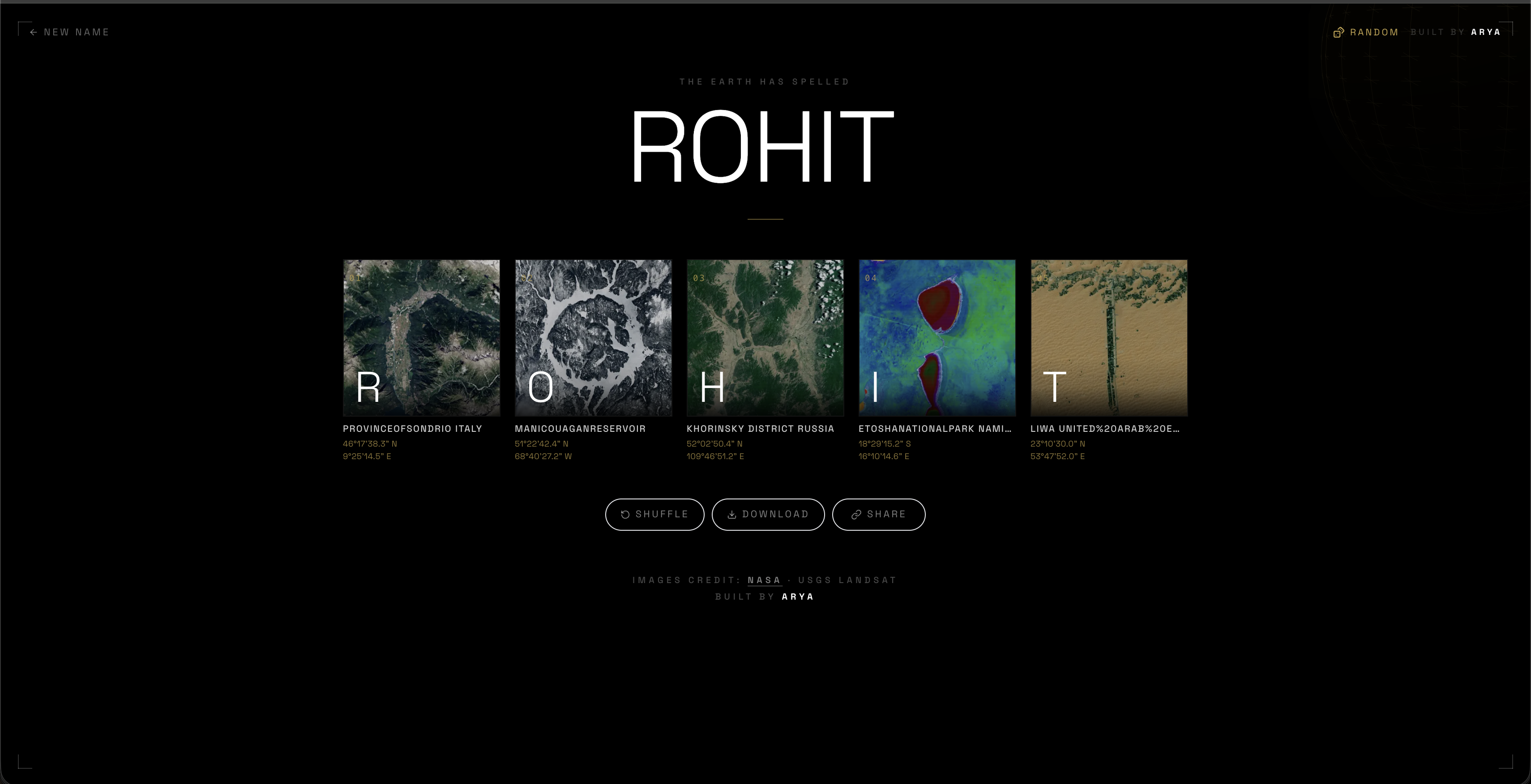
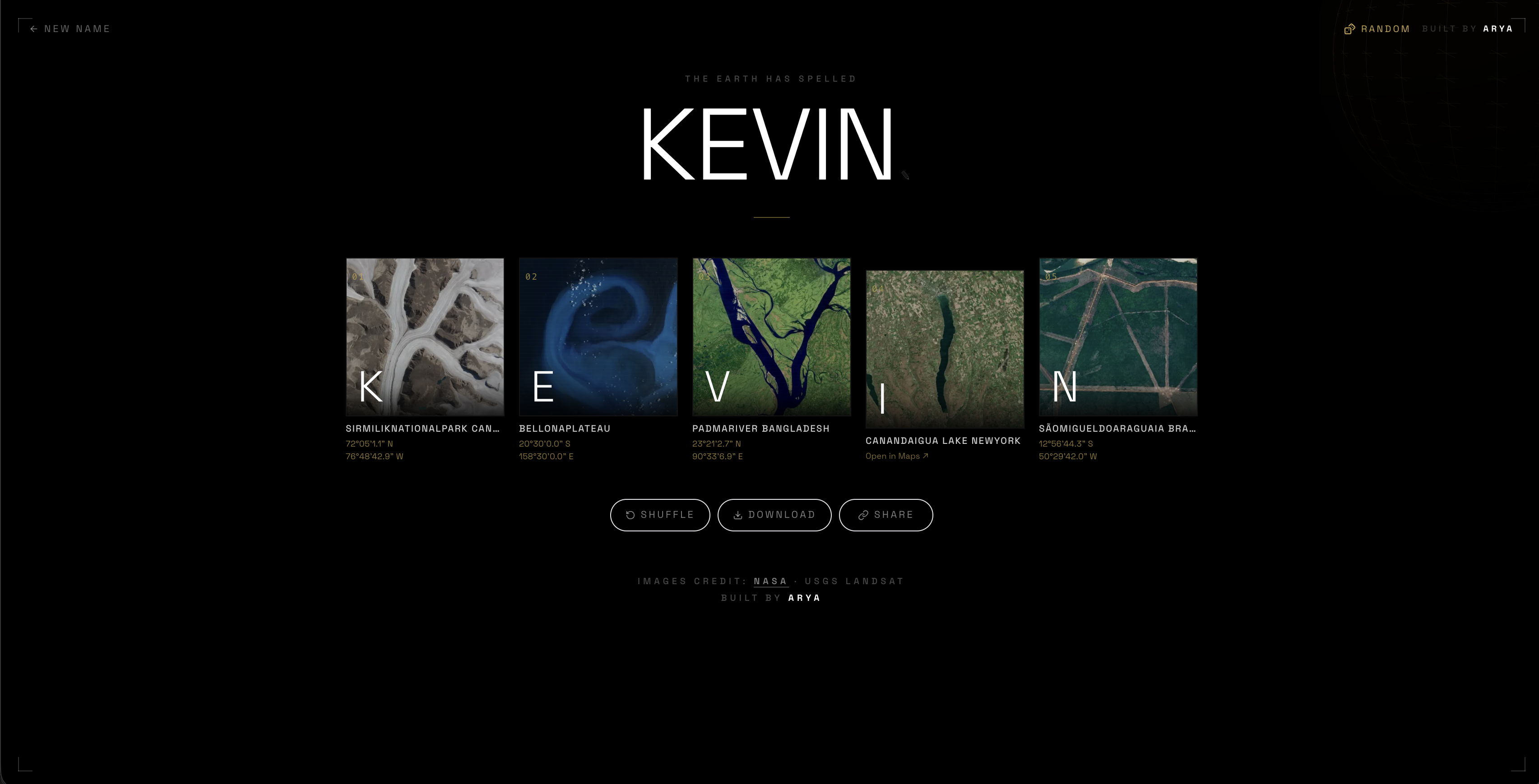
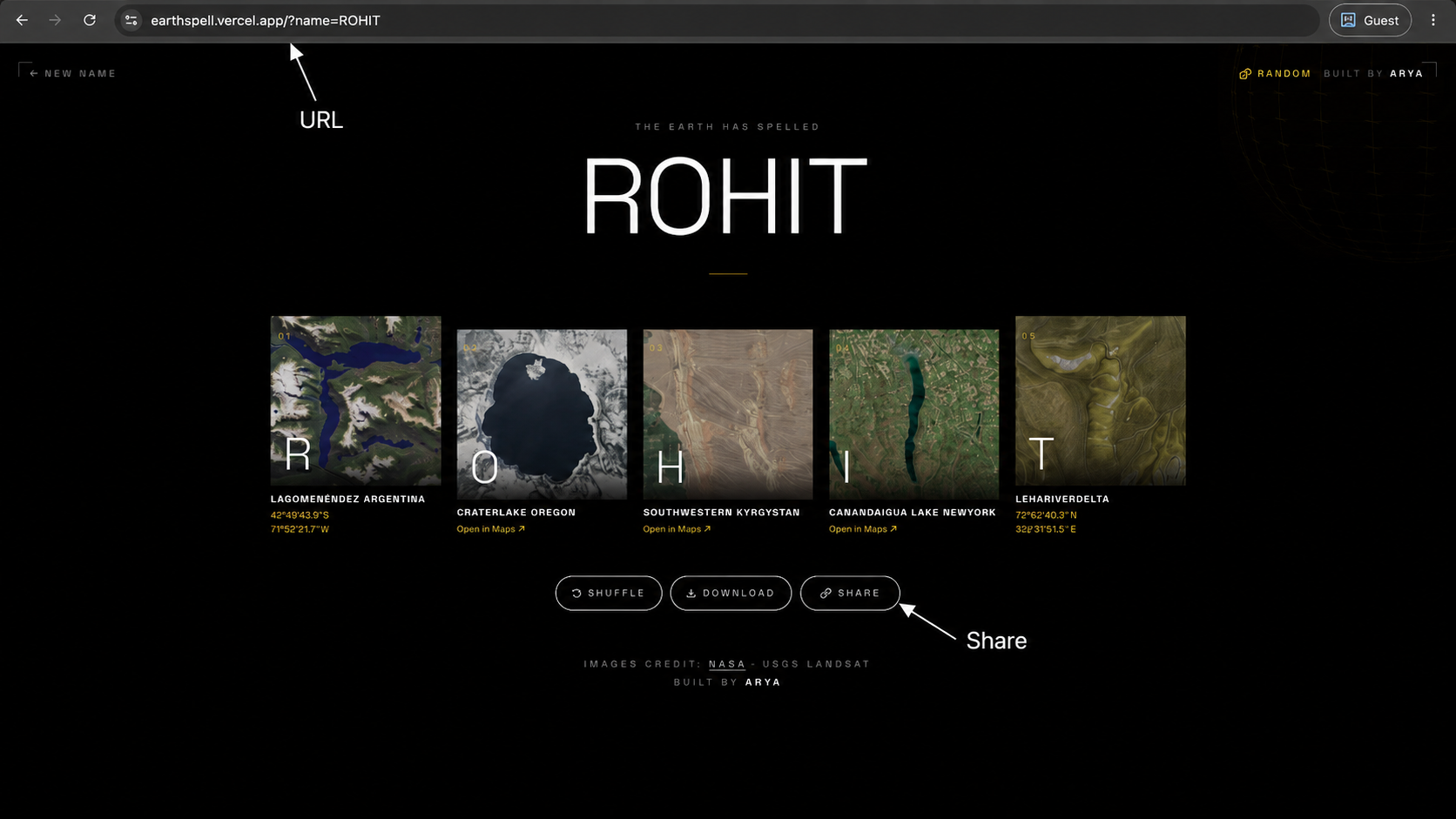
That became EarthSpell. You enter a name, the site picks matching NASA Landsat images for each letter, and you get a little poster made out of real landscapes. You can open each card, see where that letter exists on the planet, download the result, or share it with friends.
Screens

What I Built
A NASA image library
I scraped the NASA Landsat alphabet gallery with Python, pulled the letter images, location names, and coordinates, then cleaned everything into a format the app could use.
Smaller, faster assets
The original files were too heavy for a quick website. I used Pillow to convert the large PNGs into WebP images and cut the total asset size by more than 70%.
The interactive site
The frontend uses Next.js and Tailwind. When someone submits a name, the page does a quick zoom into Earth and brings the letter cards up one by one.
Custom posters
Users can download a high-res PNG poster with their name, the satellite cards, coordinates, index labels, and a small EarthSpell watermark.
The Tech
The project has two halves: a Python pipeline that prepares the data, and a Next.js app that turns that data into the actual experience.
Python scraper: uses BeautifulSoup to collect image metadata, places, and coordinate details from NASA's Landsat gallery.
Image processing: uses Pillow to convert high-res PNGs to lighter WebP files before upload.
Firebase: stores the images in Cloud Storage and keeps the letter data in Firestore.
API routes: /api/letters looks up name images, and /api/og builds custom share previews.
Problems I Had To Solve
Canvas downloads kept breaking
The download feature draws Firebase images onto a canvas and exports the final poster. Browser security did not like that because cross-origin images can taint a canvas. I fixed it by loading the images through Next.js's local image proxy first.
Repeated letters looked boring
Names like JEFFERSON can repeat the same letter a lot. I added server-side selection logic that tracks which filenames were already used and picks a different image for the same letter whenever possible.
Project
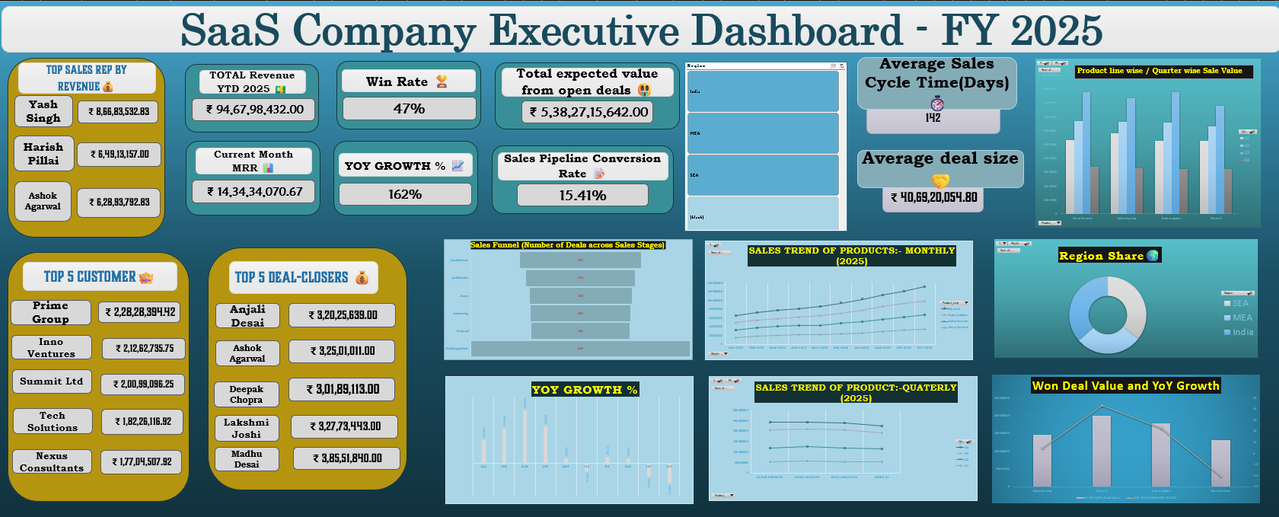
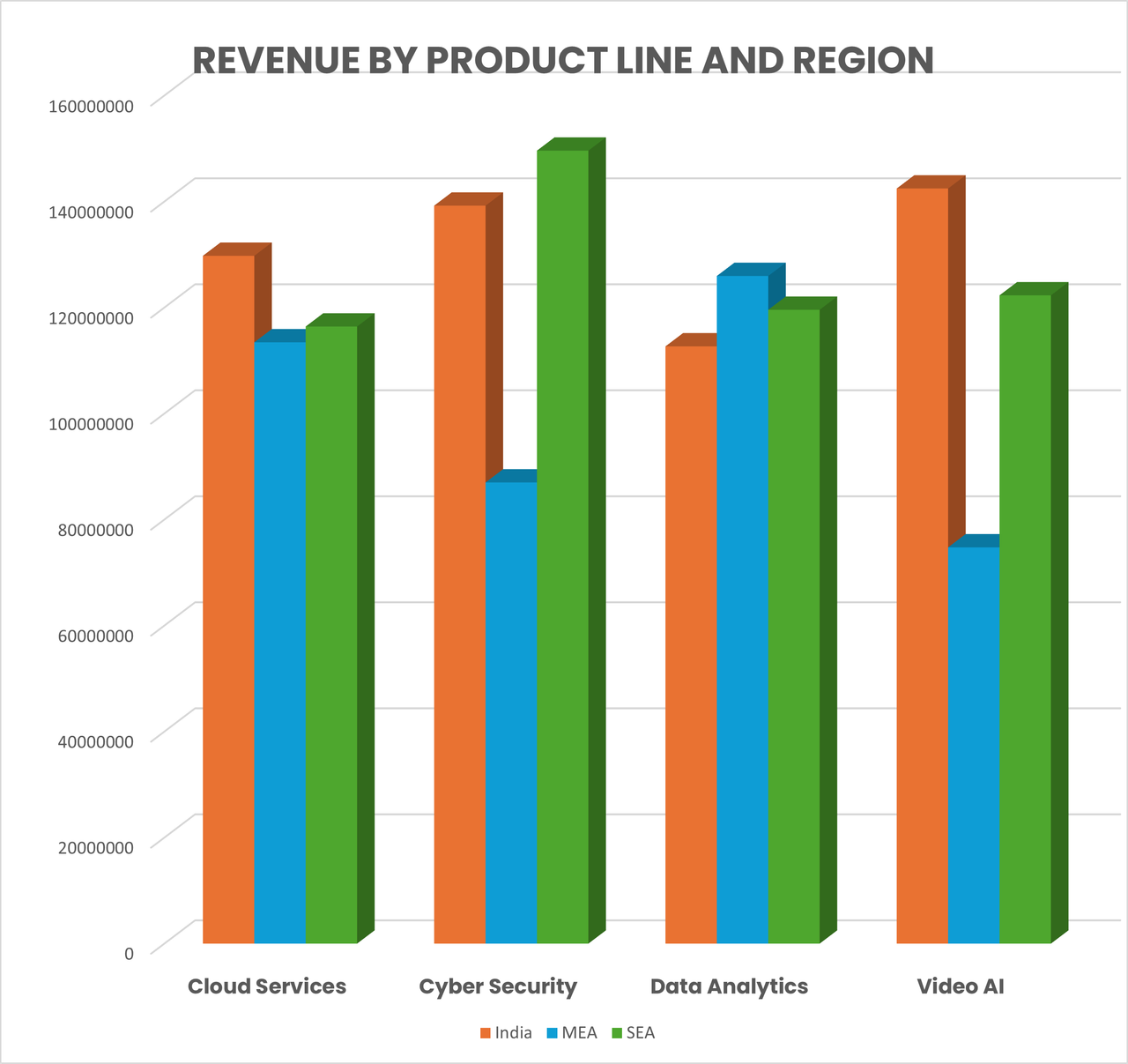
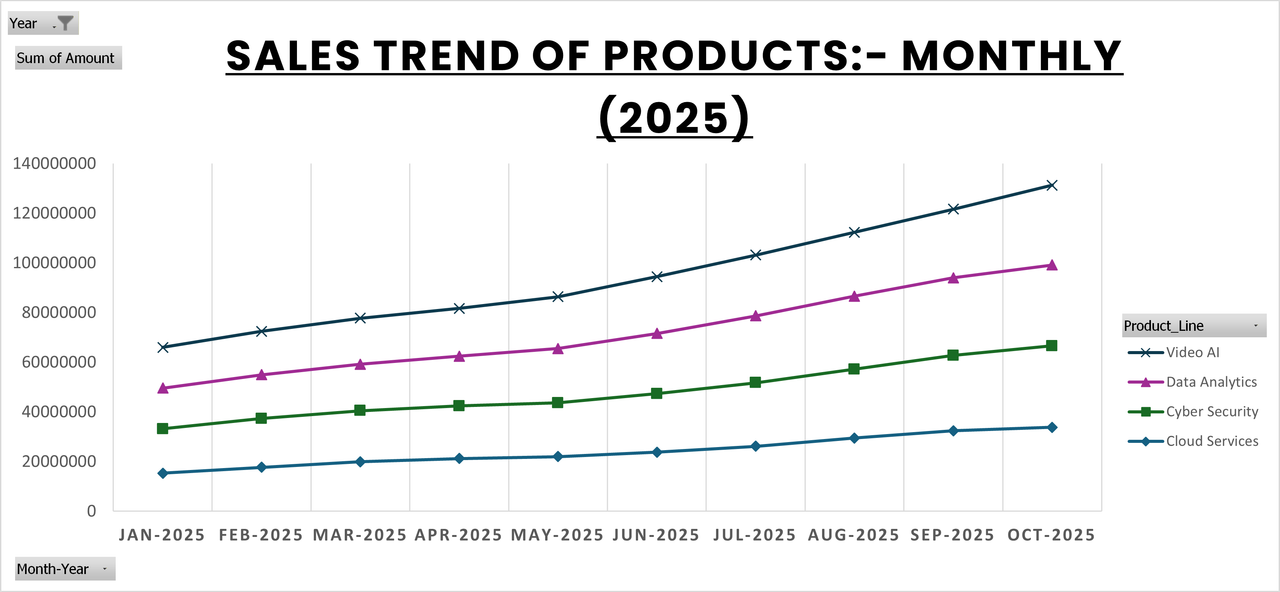
Built a fully interactive Excel dashboard for a SaaS company operating across India, MEA, and SEA — spanning 4 product lines (Video AI, Cloud Services, Cyber Security, Data Analytics) with 22 months of operational data.
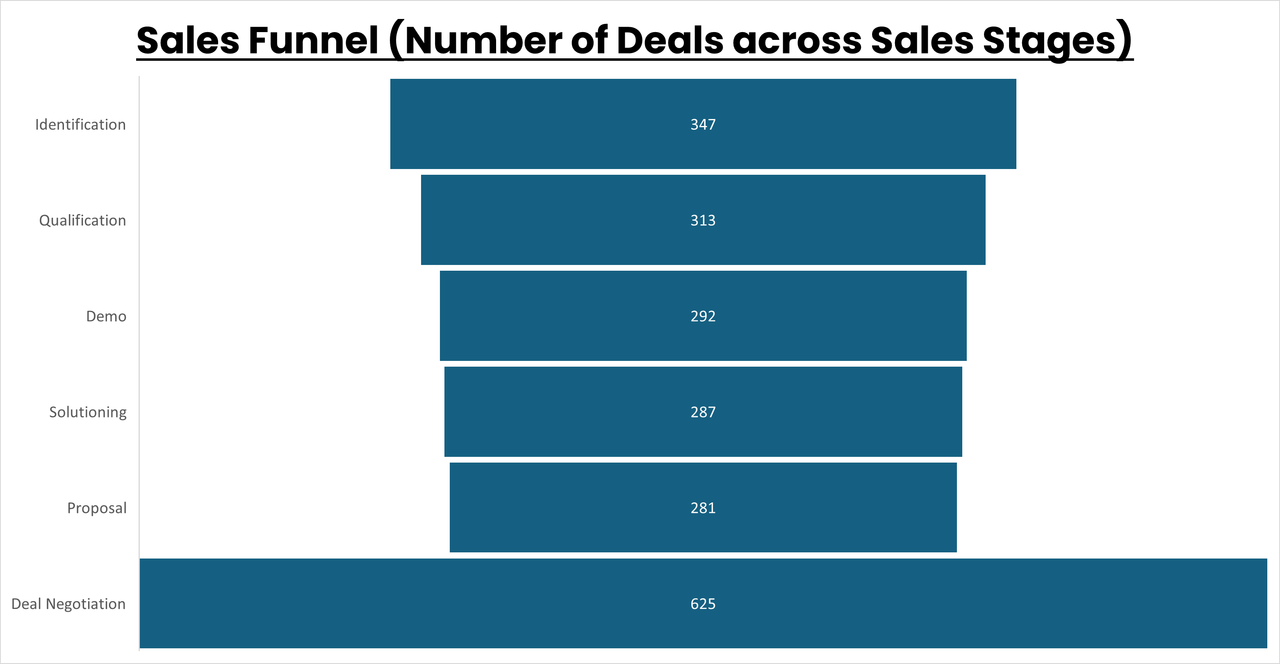
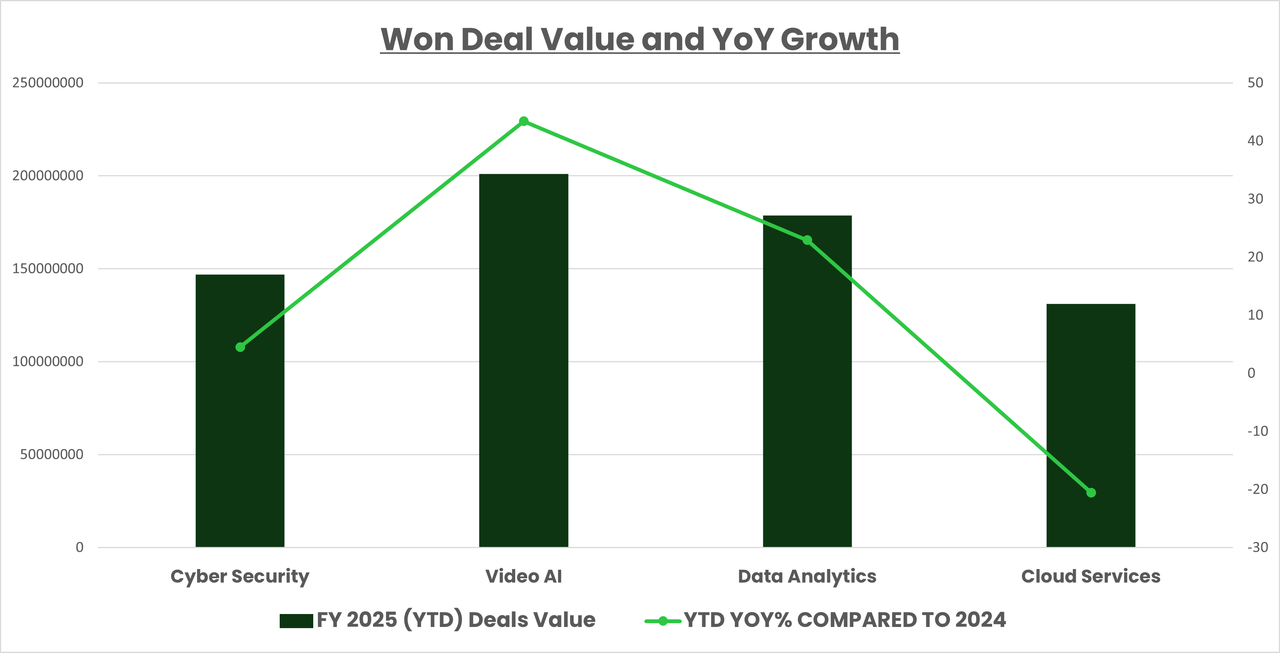
Dashboard Preview
The Problem
Raw data across 9 interconnected sheets — Revenue, Sales Pipeline, Contracts, Invoices, Employees, Clients, Support Tickets, Marketing Campaigns, and Sales Targets — with no unified view for management decision-making.
What I Built
A single-sheet executive dashboard with real-time region filtering across every metric. Key modules covered:
Quarterly YoY growth by product line, YTD revenue, October MRR from active contracts.
Won deal value by region and product, top 5 sales reps ranked by target achievement %, average sales cycle length.
Open deal aging by stage, probability-weighted expected pipeline value (stage-based win probabilities from 10% to 60%).
Product-level sales trend analysis showing volume and revenue patterns across the product catalog over time.
Top 10 clients ranked by revenue, closed deal value, and active MRR.
Won deal values tracked over time with year-over-year growth analysis to identify momentum shifts and seasonal patterns.
Contracts expiring within 5 months with account manager mapping.
Technical Highlights
Dynamic region filter using Slicers connected to all PivotTables and KPI cells simultaneously.
XLOOKUP / INDEX-MATCH across 9 relational sheets using Client_ID, Employee_ID, Campaign_ID as keys.
Calculated columns: Deal Age, Days in Current Stage, Sales Cycle Length, Days Overdue, Resolution Time, Contract Status (Active/Expired).
Combo charts (bar + line) for quarterly revenue vs YoY growth, sales funnel visualization, MRR trend lines across products.
Conditional formatting with data bars on industry-product cross-tabulations.
Key Findings
Cloud Services contributed the highest MRR in October 2025 across all regions.
Client Referral had the highest win rate among all deal channels.
A significant percentage of support managers had a majority client base outside their assigned region.
Tools Used
Microsoft Excel — PivotTables, XLOOKUP, INDEX-MATCH, Data Validation, Slicers, Combo Charts, Conditional Formatting, Data Bars.
Things I've built.
Hit your limit on Claude, ChatGPT or Gemini? Download the whole chat as clean Markdown and paste it into another model. Full context, one click.
A Chrome extension that scrolls YouTube Shorts and Instagram Reels when you open your mouth — eyebrows go back. Face tracking runs locally in the browser, zero dependencies, no build step.
Type a name and see it spelled with real NASA satellite photos of places on Earth that naturally look like letters. Built with a Python scraper feeding a Next.js site.
End-to-end Excel dashboard built from raw operational data across sales, revenue, HR, and marketing. Turned 9 disconnected sheets into an executive-ready view with live region filtering.
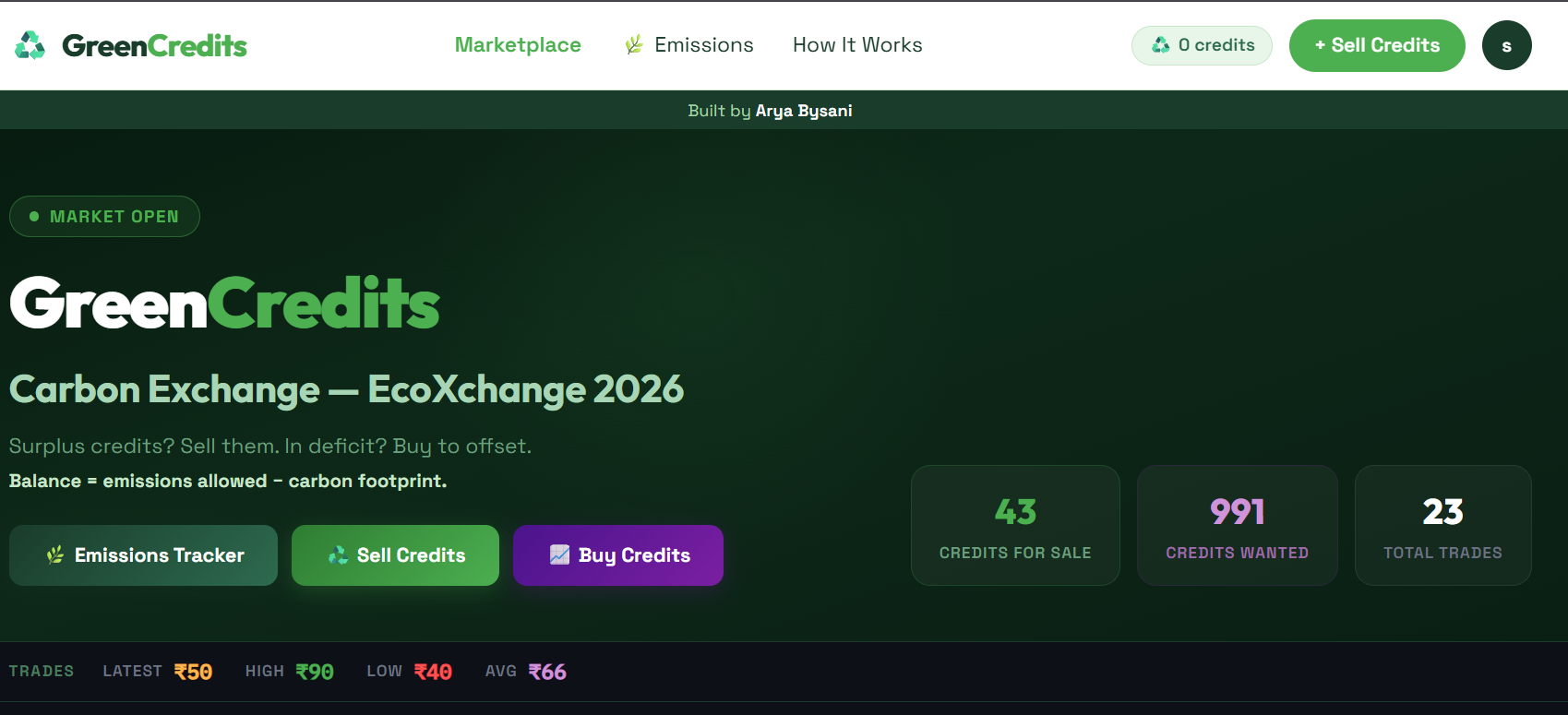
Real-time order book trading platform for carbon credits, built for TAPMI's classroom trading session. Buy and sell orders match instantly on placement — like a stock exchange, not a batch auction.
Project · Full Stack
A real-time order book trading platform built for TAPMI's classroom carbon credit auction. Teams log in and trade carbon credits against each other — buy and sell orders match instantly on placement, the same way a stock exchange works.
The Problem
TAPMI runs a classroom simulation where student teams trade carbon credits with each other. The existing process was manual — no real-time price discovery, no order matching, no live portfolio tracking. I built the infrastructure to run it like an actual exchange.
What I Built
Orders match immediately on placement — no batch auction. Sell orders match against the highest bids first; buy orders match against the cheapest asks first. Settlement price is always the seller's ask. Partial fills are fully supported on both sides.
Every order goes through five checks: authenticated session, trading enabled by admin, account not banned, carbon balance set, and sufficient balance for sells. Credits are escrowed immediately on sell order placement.
Admin can open and close trading with a single toggle, set each team's opening carbon balance, and ban accounts. A system_settings table with a single trading_active flag gates all order placement across the platform.
Five Postgres tables via Supabase: teams, listings (sell orders), buy_orders, transactions (every completed trade), and system_settings. Order statuses track the full lifecycle: live → sold, open → partial → filled.
Stack
FRONTEND
Next.js (App Router)
DATABASE
Supabase + Postgres
DEPLOYMENT
Vercel
AUTH
Supabase Auth
it does not even exist 😭
bro really typed that into the URL bar and expected a whole page to show up